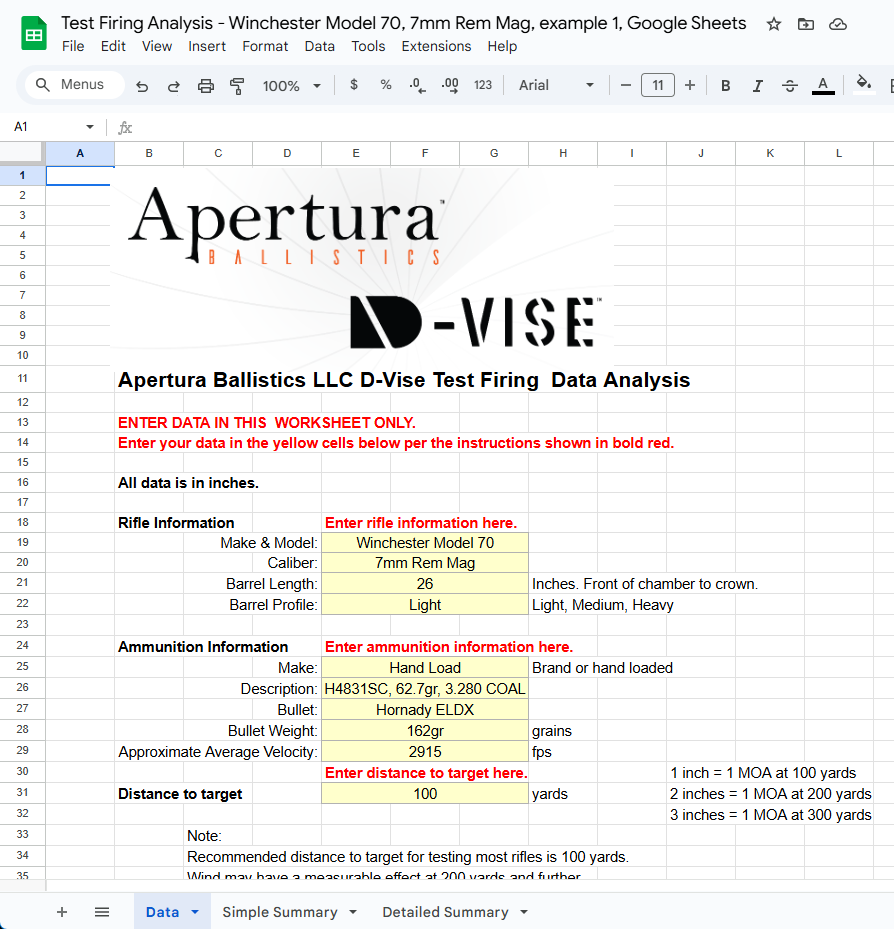
How to do your target analysis...
Now that you have either the Google Sheets or Microsoft Excel spreadsheet downloaded and ready to go, let’s get started entering your data and going through the results.
The process is exactly the same using either Google Sheets or Microsoft Excel. There are a couple minor differences in how the graphs are formatted due to limitations in Google Sheets, but basically everything looks and operates the same between the two. One key difference is that if you are using Microsoft Excel, make sure you save your work when you are done. Google does this automatically.
All your data will be entered on the “Data” tab in the light yellow cells.
Near the top you will find a section to enter your rifle and ammunition information and the distance to the target. This is so you know what you were shooting at some point in the future when you’re likely to have forgotten and is very useful for keeping your testing straight.
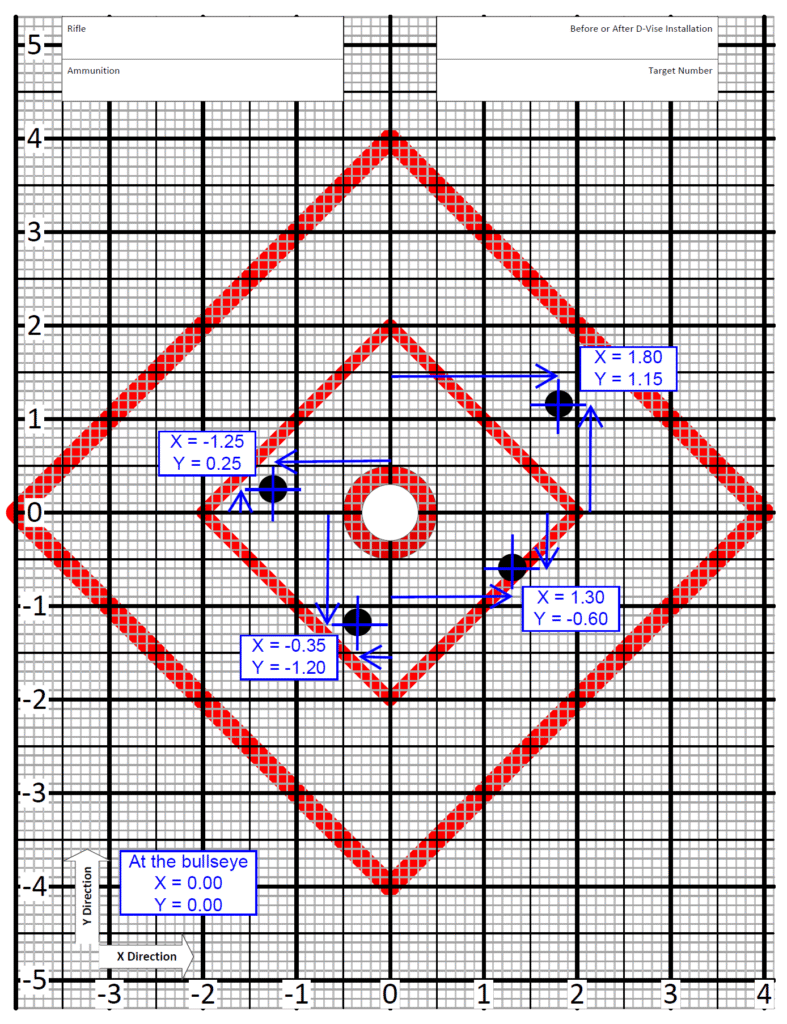
The next step is to get the location of each shot on the targets. This picture illustrates how this is done. See How to use the targets for more details.
You will see numbers along the heavy grid lines on the left and across the bottom. The horizontal numbers are the “X” direction and the vertical numbers are “Y” direction. The center location (bullseye) is X=0.00, Y=0.00. Left of center, X is negative. Right of center, X is positive. Below center, Y is negative. Above center, Y is positive.
The heavy black gridlines are spaced 1 inch apart. The thinner black gridlines are spaced 0.50 inch apart. The grey gridlines are spaced 0.10 inch apart. As you will see, it is fairly simple to estimate the shot location to within 1/2 of the spacing of the grey gridlines, or 0.05 inch. A location to within 0.05 inch is plenty precise for our purposes and trying to estimate shot location more precisely won’t have any meaningful, and probably not any numeric, effect on the results.
We recommend firing only 5 shots maximum, maybe fewer, on a single target to keep from having shots hitting the same location and being difficult to measure the locations accurately. The paper to print a target is cheap. Bullets and errors are expensive. Measure the locations for each shot on multiple targets. The spreadsheet will combine all the shots and overlay them for the analysis.
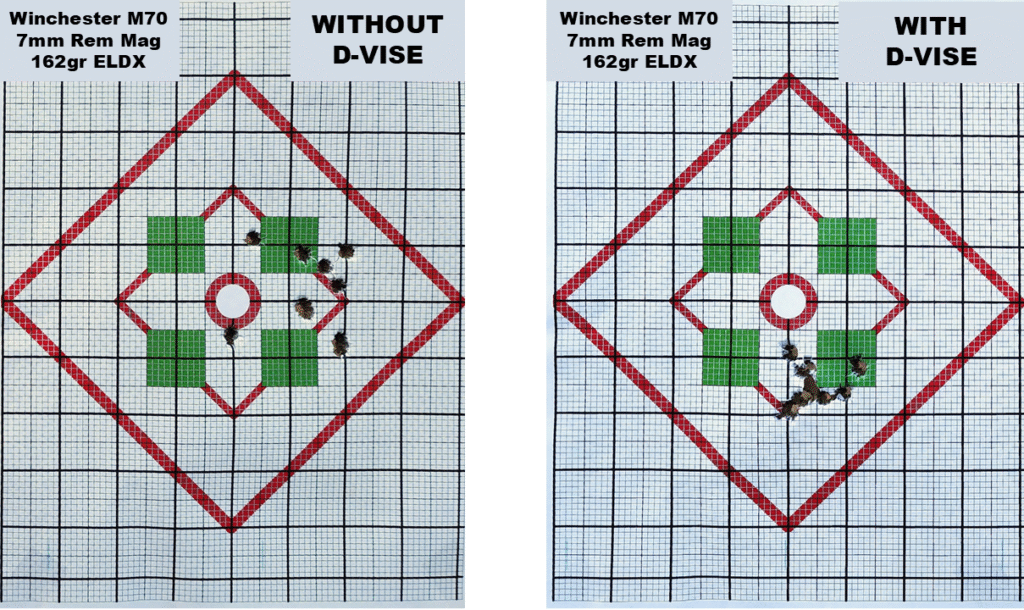
For this example, here are two targets with 10 rounds each shot from a Winchester Model 70 in 7mm Rem Mag. The before vs after difference is pretty large, so 10 rounds before and after is sufficient to show that the change is real and not a statistical fluke, but 20 rounds before and after would provide more certainty. We generally recommend 20 rounds before and after.
Notice that on the second target many of the holes in the target are touching. This makes it more difficult to get accurate locations for each of the rounds. Suppose two or three went through the same hole. It then gets even more difficult. For this reason we recommend shooting multiple targets and keeping it to about 5 rounds on one target. Paper is cheap. Bullets are not.
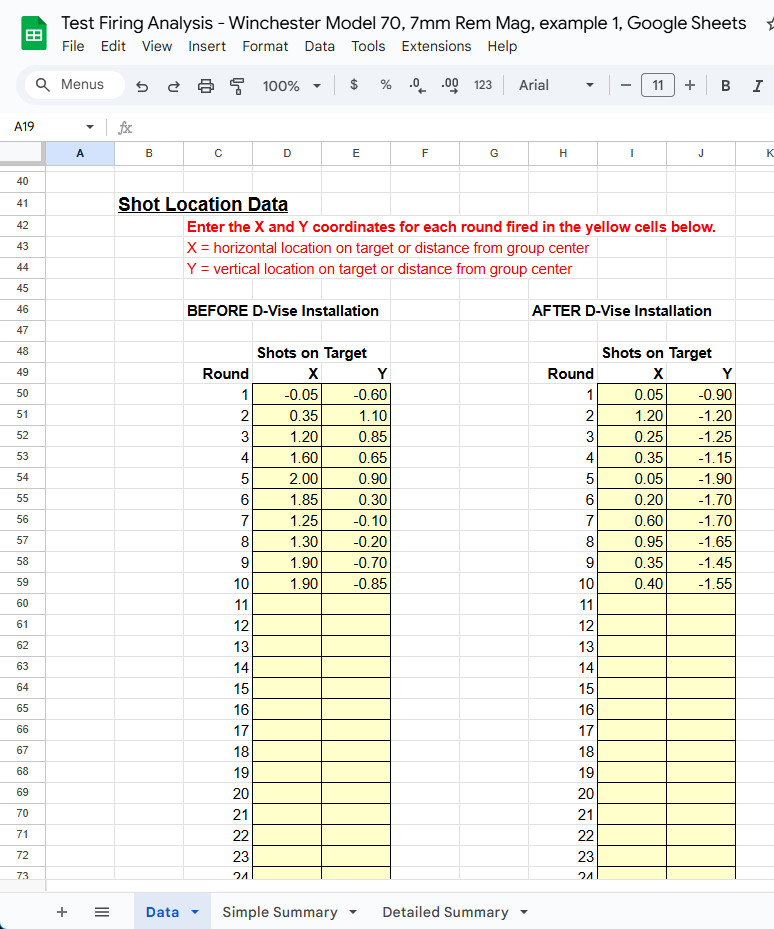
As you read each bullet impact location from the target, enter it into the “Data” tab in the spreadsheet as shown here.
It does not matter what order you enter the shot locations, but it is critically important that the horizontal and vertical location of each shot does not get mixed up with other shots and that the before and after data does not get mixed.
It is also a good idea to copy and paste photos of the targets into this tab.
Now you can move on to see the results. First let’s go over the “Simple Summary” tab.
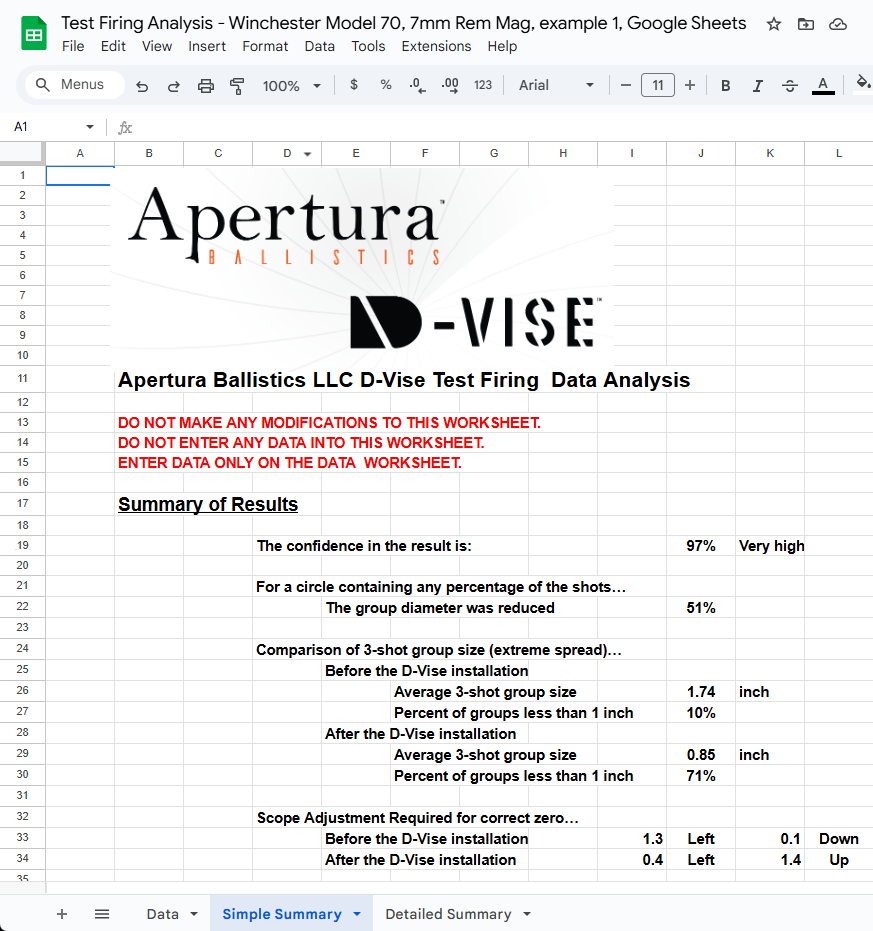
The first thing to notice is the confidence in the results. In this case, we’re 97% confident that the results are valid, which is very high confidence.
The next item on the list shows how much the group diameter was reduced, which was 51% in this case.
This group diameter is the size of the circular group that contains any given percentage of all the shots the rifle is expected to make based on the dispersion in the data.
Next we get to a comparison of 3-shot group sizes and how well the rifle shoots a 1 MOA group.
In this case, before the D-Vise was installed, the average 3-shot group was 1.74 inches and only 10% of groups would have been 1 MOA or less. That’s not the type of performance we generally want, but believe it or not, it’s actually pretty typical of a descent hunting rifle in a magnum caliber. But, with the D-Vise installed, the average 3-shot group shrinks to 0.85 inch and 71% of our groups will be less than 1 MOA. Now we’re talking!
Next we see how to adjust our scope to have a correct zero both before and after the D-Vise was installed.
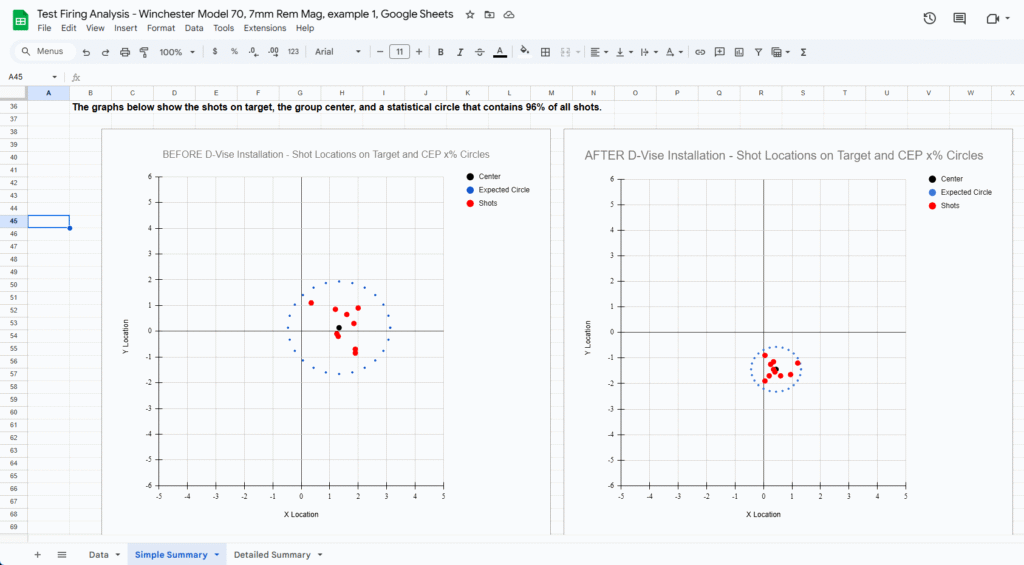
Finally, at the bottom of the tab below the “Summary of Results” we find two pictures comparing our targets.
The red dots are the locations of each round. Examine these to make sure they match with the actual target. If they do not, then something was entered incorrectly in the data and the results will not be correct.
The black dot is the center location of the group. This is what the scope correction information is based on.
The circle of blue dots outlines the circle that contains 96% of the shots the rifle is expected to make based on the dispersion in the data. The reason 96% is used is because it is within 1% of being at two standard deviations and the radius of this circle is twice the mean radius. Very convenient. This circle is somewhat dependent on how many rounds you shoot for this test and the resulting level of certainty in the variation. In general, fewer rounds means a somewhat larger circle and more rounds means a somewhat smaller circle. The more rounds we shoot, the closer this estimate is to the true size.
Notice for this example, before the D-Vise is installed, we would expect that if we fired 100 rounds, then 96 rounds would fall within a circle about 3-1/2 inches in diameter. Yikes! Now understand that the majority of them would be much tighter in the center than that, but this is reality for a typical and descent quality hunting rifle.
Compare this to the result after the D-Vise is installed. The circle is slightly less than 1/2 the diameter, which is slightly less than 1/4 the area. That’s a big improvement. The circle diameter is now down to about 1-3/4 inches. At first you might think that still is not very good. But, this is the diameter that contains 96% of the shots and, as before, the majority are grouped much tighter in the center. This rifle is now shooting a 0.85 inch average 3-shot group and 71% of the groups are less than 1 MOA. This is now a sub-MOA rifle!
The “Detailed Summary” tab is intended for those who want to geek out on the results and look at them in more detail. If your don’t feel like you really want to get into a high level of detail, statistics, and math, feel free to skip the rest of this.
At the top of this tab is the rifle and ammunition information which is identical to what you entered on the “Data” tab.
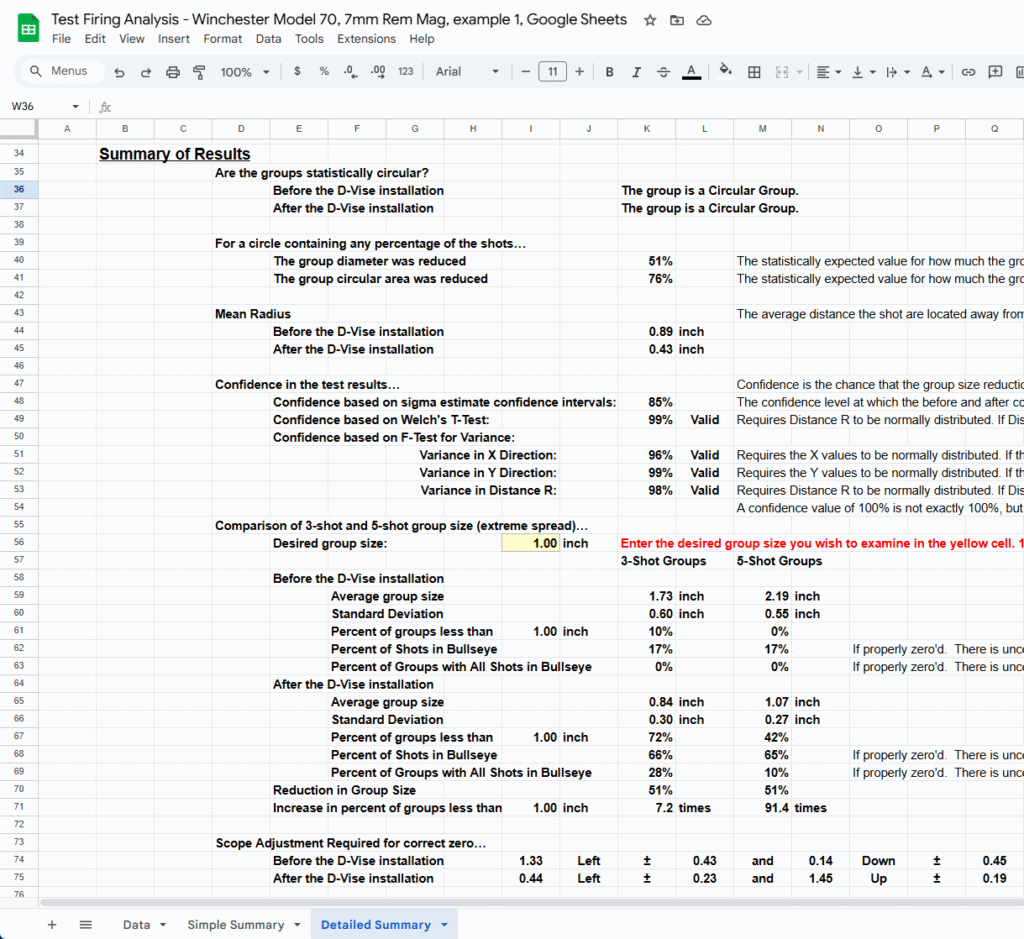
Next, the “Summary of Results” section provides even more detailed information about the precision and accuracy of the rifle before and after the D-Vise was installed.
The summary first tells you if the groups were close to circular. This means that the variation in the horizontal and vertical directions were close enough to being equal that you cannot statistically say they are different. We have seen examples in our testing where a rifle did not shoot a circular group before the D-Vise was installed, but did shoot a circular group with the D-Vise installed. A rifle should shoot circular groups at short ranges like 100 yards.
It then shows you how much the group diameter shrank, the same as in the “Simple Summary” but also adds the reduction in area. As you can see in this example, and was discussed earlier, a reduction in the diameter of 51% equates to a reduction in area of 76%, or just over 3/4. So the rounds are impacting an area that is just under 1/4 of the area that they were without the D-Vise.
Here we also provide the values for the mean radius before and after the D-Vise was installed. This number is key to understanding shot dispersion. The mean radius is the average distance that the shots are from the center. Half of the shots will be closer than this and half will be less than this. And, 96% of the shots will fall within a circle with a radius of twice this value or a diameter of four times this value. For precision, this tells you what you really need to know.
We then get into the confidence in the test results. Ideally you want all these confidence values to be high. There are three types of statistical tests done in the background and one of those tests has three parts to it. We show you the confidence in the results for each one of these tests and tell you if the data creates any conditions for which any of the tests would be invalid.
The next section deals with comparing 3 and 5-shot group sizes before and after the D-Vise was installed. Here you have the option of entering a desired group size into the light yellow cell, so you are not limited to just 1 inch or 1 MOA, but any size you would like to investigate. Besides telling you the average group sizes, this also tells you how much variation on the group sizes your rifle produces, what percentage of your shots are in the bullseye, and what percentage of groups will have all 3 or 5 shots in the bullseye if your rifle is properly zero’d. It then tells you the increase in the percentage of 3 and 5-shot groups that are within the desired group size.
Lastly, as in the “Simplified Summary”, we see how to adjust our scope to have a correct zero both before and after the D-Vise was installed. The added detail here is that it also provides the 95% confidence window around the calculated values. Again, to shrink that confidence window and be more confident in your scope zero, you should shoot more rounds. Shooting 10 rounds is an absolute minimum. Shooting 20 is much better. Shooting 30 will usually provide as small of a confidence window as anyone would probably want.
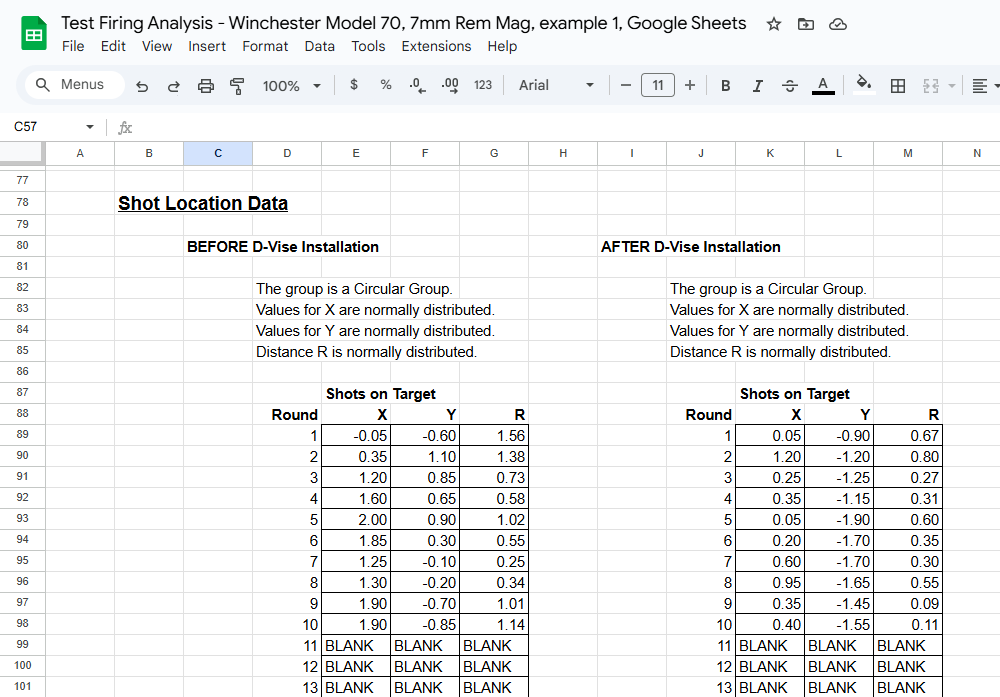
The next section is the “Shot Location Data”. This shows the coordinates of the shots that you entered in the “Data” tab, plus also shows you a value called “R” with is the distance each shot is from the center of the group. At the top of the tables you are told if the groups are circular and if X, Y, and R are normally distributed, which is important for validity of the results. The values for R technically follow a chi-squared distribution, but that distribution is often shaped very closely to a normal distribution which is necessary for one of the statistical tests to be valid.
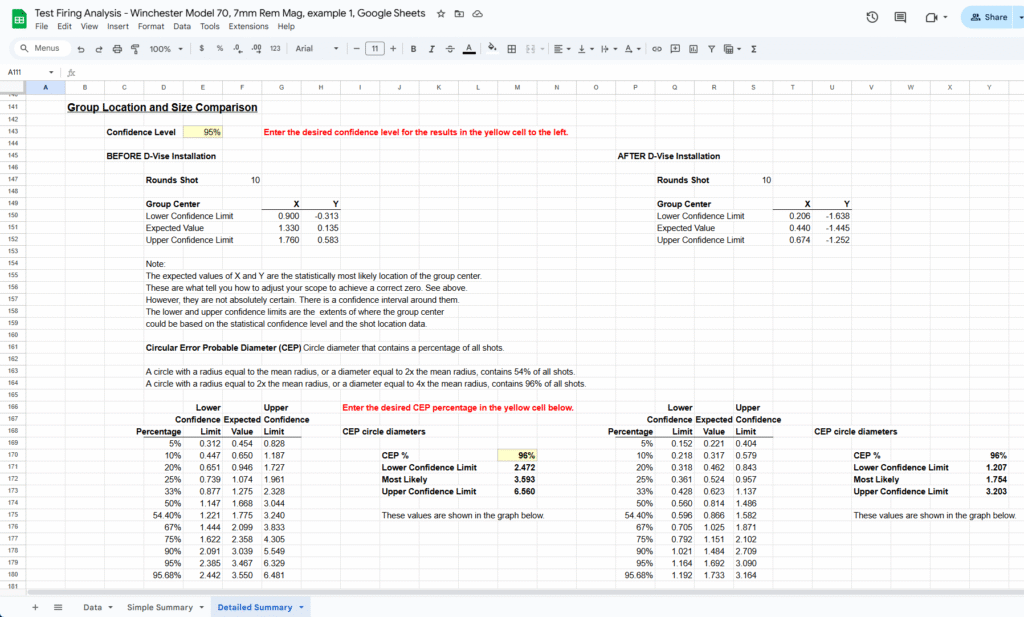
The next section is “Group Location and Size Comparison”. The first parts shows where the center of the groups are located on the target, which is the same thing as how to properly zero your scope. The comparison of group size is probably the most technically deep part of the results. This goes into the concept of Circular Error Probably (CEP) diameter. As you saw in the “Simple Summary” tab, there was a circle around the shots that showed how big a circle would contain 96% of all shots. This is the same thing only it can be calculated for any percentage of shots and a table is provided to show a number of percentages.
You will also note that there are two light yellow cells in which you can enter values.
The one near the top of this section is “confidence level” which will change the values for the confidence limits shown for the group center and the CEP values. A lower confidence level will provide tighter confidence limits and a higher confidence level will provide wider confidence limits. This is useful for finding out how confident you can be that your shots will fall within a certain area.
The second light yellow cell lets you determine the CEP circle diameter for any percentage of shots that you may be interested in, not just the ones shown in the table. For instance, if you wanted to know how big the circle diameter would be that contains 82% of the shots, enter 82% and it will calculate it for you.
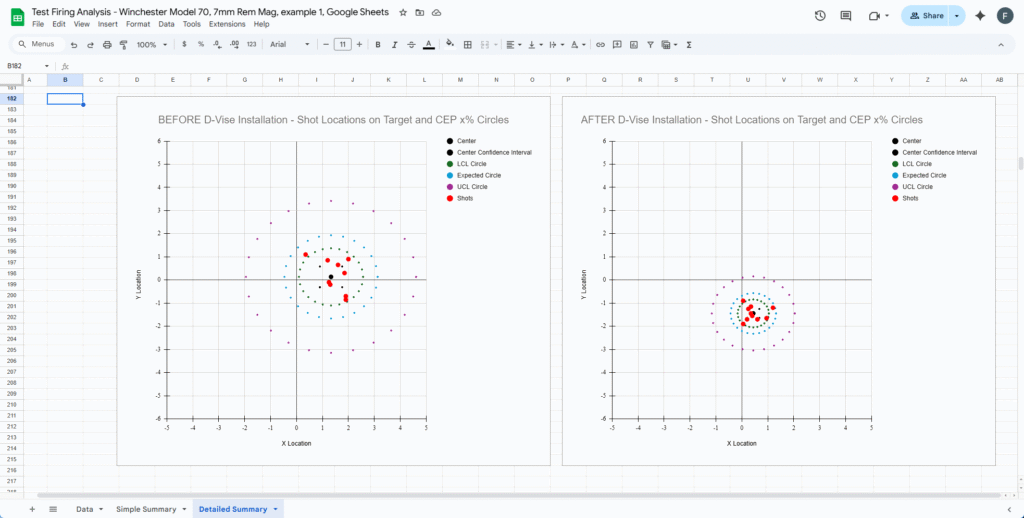
Lastly, we provide two graphs similar to those shown in the “Simplified Summary” tab but with some additional detail.
First, the graphs include the confidence limits around the center of the groups. The center is shown as the large black dot. The corners of the confidence limits are shown as four smaller black dots. These form a box which is the confidence window for the group center. So, if you have the default 95% entered for confidence level above, then this represents the box in which you can be 95% sure that the true center of your group lies within. Shooting more rounds will shrink this box giving you a more precise zero for your scope.
Second, the graphs include confidence limits around the CEP diameter. The CEP diameter will depend on whatever CEP % you have entered above, 96% by default. The circle of blue dots represents the expected diameter of this circle. The green circle of dots represents the smallest diameter it could be based on the confidence level entered above. And the circle of purple dots represents the larges diameter it could be based on the confidence interval above. Note that the distance between the blue and purple circles is more than the green and purple circles. There is less potential for a statistical error to be on the small side than the large side.
The size of these circles in the two graphs are the basis for the “confidence based on sigma estimate confidence intervals” shown above. If you have 90% confidence (10% chance of error) set, then if the green circle of dots in the “BEFORE D-Vise Installation” graph is smaller than the purple circle of dots in the “AFTER D-Vise Installation”, then you can be 95% confident (5% chance of error) that the “AFTER D-Vise Installation” groups are smaller than the “BEFORE D-Vise Installation” groups based on this method of calculation. This is not the only valid method, but it is the most conservative.